

Payment Issues
Monitor billing health from the CampiumDB dashboard with payment issue shortcuts, badge counts, ACH visibility, and payment digest controls.
Overview
Use Payment Issues on the CampiumDB home dashboard to quickly open the billing reports and screens that need attention. This card brings scheduled payments, payment plans, missing payment methods, and related money problems into one place so you do not need to search through the full report menu.
Where to find it
The Payment Issues card appears on the CampiumDB home dashboard only when your login can use financial tools. If your account is on a limited free plan that hides billing, or your role does not include financial access, the card does not appear.
Open the home dashboard
- Sign in to CampiumDB.
- Go to the home dashboard.
Look for the Payment Issues card
- Find the Payment Issues card on the dashboard.
- If it appears, open the links you need from that card.
- If it does not appear, review the access notes later on this page.
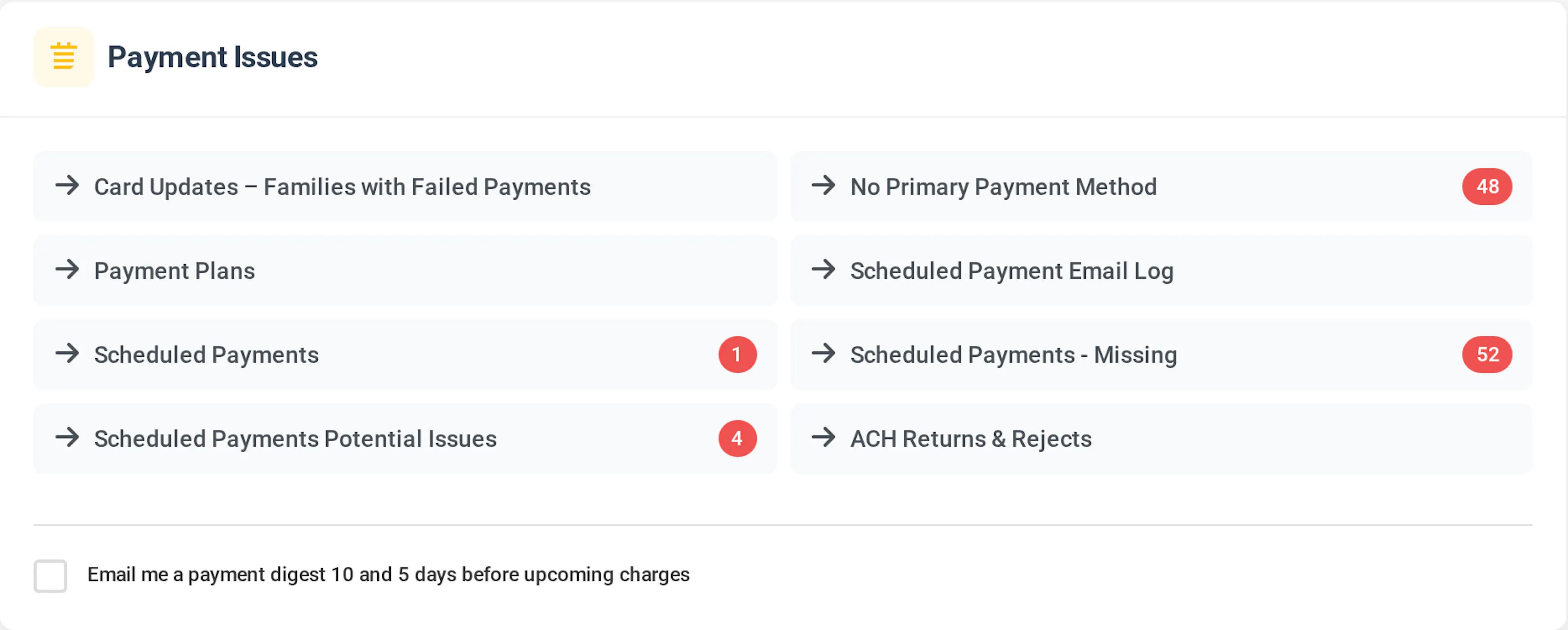
What this section is for
Payment Issues is a shortcut area for scheduled payments, payment plans, and related money problems. It gathers links to the same reports you would use to see who is scheduled to be charged, who might fail, who is missing a payment method, and similar items.
That makes the card useful for staff who monitor billing health throughout the day and need the right list fast.
How the shortcuts work
Each line in the card links to a focused report or screen. Click the line to open that list and review the families or payments that need follow-up.
Some links may open in a new browser tab. If that happens, keep the dashboard open so you can return to the card and move through other payment checks.
Numbers on the right
For several links, CampiumDB shows a count on the right when there is something to review. The count acts as a quick signal so you can decide which item needs attention first.
- Red-style badges usually mean the item needs attention, such as missing payments or potential charge problems.
- Blue-style badges are informational counts.
- Some links intentionally never show a badge, even when the report contains records.
These links do not show count badges by design: Payment plans, Card updates – families with failed payments, and the scheduled payment email log. Open those items from the card when you need the full list.
ACH returns and rejects
If your camp uses ACH bank account payments, you may also see ACH returns & rejects in the Payment Issues card. When there are open items, this line can show a count as well.
If you do not use ACH, this line may not appear. When it does appear, use it to open the ACH returns and rejects report and follow up on returned or rejected ACH payments.
Season context
Everything in the Payment Issues card follows your current default season, or the season context used by those reports. That keeps the dashboard focused on the registration year you are actively working in.
If a count or list looks different from what you expect, confirm that you are working in the correct season context before you investigate further.
Email digest
At the bottom of the Payment Issues card, you may see the checkbox for Email me a payment digest 10 and 5 days before upcoming charges. This setting controls whether CampiumDB emails your user account a recurring payment health reminder.
What it does
When the checkbox is on, CampiumDB sends a payment health digest ahead of upcoming automatic charges. The digest is designed to surface families who may have trouble when the next charge runs.
The reminders are sent when the next charge is 10 days away and again when it is 5 days away. When relevant, the digest can also summarize open ACH returns or rejects and families who owe a balance but do not have a primary payment method on file.
How you control it
Find the digest option
- Go to the Payment Issues card on the home dashboard.
- Look at the bottom of the card for the payment digest checkbox.
Turn the digest on or off
- Check the box to receive the digest.
- Uncheck the box to stop future digest emails for your user account.
Confirm the change saved
- Your choice saves as soon as you check or uncheck the box.
- Look for a short confirmation message that the change was saved.
Who gets it by default
Account administrators are generally included in these digests unless they turn the checkbox off. Other staff members do not receive the digest by default.
If you are not an account administrator and want the digest, opt in by checking the box on the dashboard.
Timing
Campium sends digest emails on a daily schedule in the morning, Eastern Time. You receive the 10-day and 5-day reminders when your account has something to report for those upcoming charge windows.
That means you may not receive a message every day. CampiumDB sends the digest when there is relevant payment health information to summarize.
Stopping the emails
Turn off the checkbox on the dashboard at any time to stop future digest emails for your user account. The change saves immediately when you uncheck it.
Digest emails also include a way to opt out. Use either method when you no longer want these reminders.
If you do not see Payment Issues
You need access to financial features in CampiumDB to see the Payment Issues card. If the card is missing, your role may not include that access.
Ask an account administrator or the person who manages roles and permissions to review your access. If your access cannot be changed, ask that person to run the needed reports for you.
Best practices
Use the Payment Issues card as a daily starting point for billing review. The card works best when you treat it as a triage list instead of waiting until scheduled charges fail.
- Review red-style badges first.
- Check the card in the correct season before acting on counts.
- Open links that do not show badges when you need the full list, especially payment plans and the scheduled payment email log.
- If your camp uses ACH, review ACH returns and rejects promptly so receivables stay accurate.
- Turn on the payment digest if you want advance notice before upcoming automatic charges.